Bedrock Edition 26.20 is here, and the headline is a brand-new mob that nobody saw coming: the Sulfur Cube. It’s weird, it’s yellow, and it changes form depending on what blocks you feed it. Beyond the new mob, this update also bundles the long-awaited Realms party joining, more OreUI screen migrations, and a major fix to scrollable content on phones with notches.
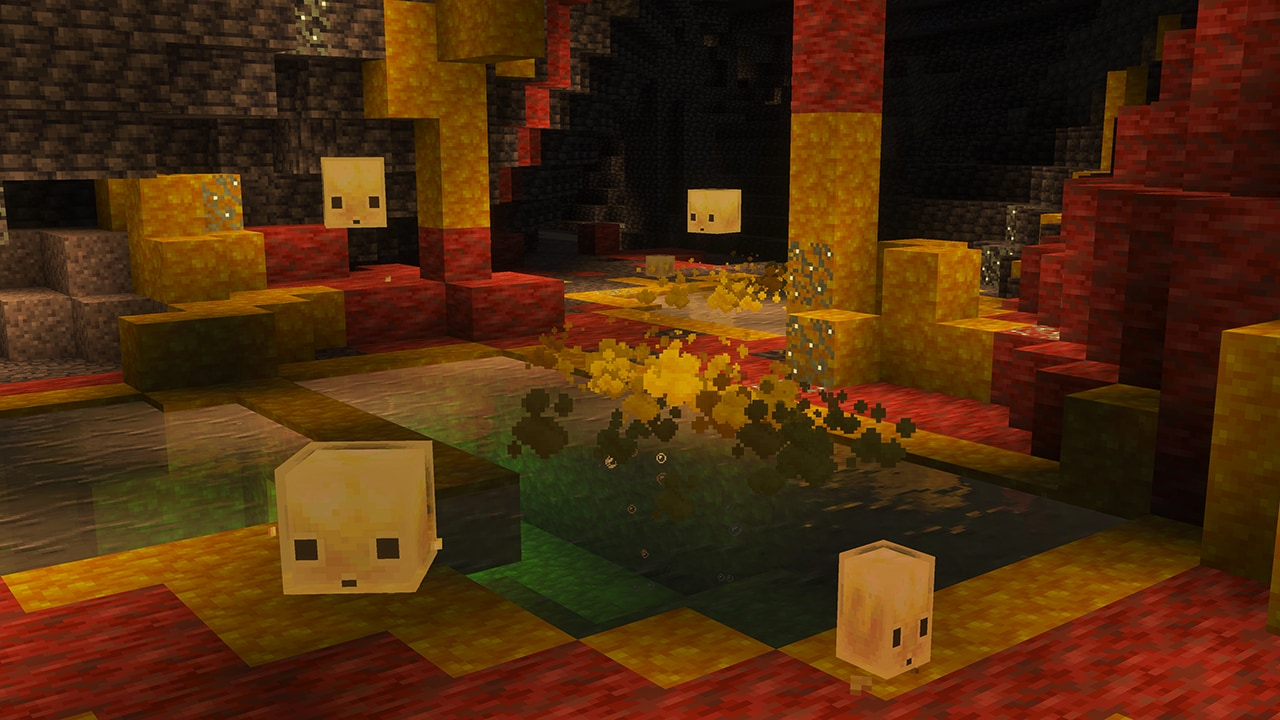
The Sulfur Cube
Sulfur Cubes spawn in a new structure called Sulfur Caves — rare biome-locked variants of the standard cave system. The mob itself is curious rather than hostile. It will follow players and inspect blocks the player places, but won’t attack unprovoked.
Feeding It
The whole gimmick is feeding. Right-click the Sulfur Cube with various blocks and it transforms its movement and behavior to match:
| Feed | Behavior |
|---|---|
| Slime Block | Bouncing — jumps continuously across short gaps |
| Ice | Sliding — glides smoothly along flat surfaces |
| Honey Block | Slow Sticky — sticks to walls and ceilings |
| Soul Sand | Sinking — partially submerges into the ground |
| TNT | ...don’t. Just don’t. |
Knockback Physics
What makes the Sulfur Cube genuinely innovative is its knockback model. When you hit it, the angle and position of your attack determine where it flies:
- Hit from the left → it gets knocked to the right.
- Hit from the top → it slides forward along the ground.
- Hit from the bottom → it pops upward (think pinball flipper).
- Bigger damage = bigger knockback distance.
This opens up entire new redstone contraption possibilities — the Cube can now be used as a positional projectile that you aim with hit angle. Expect to see automatic Sulfur Cube cannons in community videos within weeks.
Realms: Party Joining
One of the most requested features of the last two years finally lands. You can now join a Realm together with your party in one action. Previously, every party member had to receive an invite link or be added to the Realm permission list individually. Now if one member of the party has access, the whole party can pile in.
The Realms world edit screen also got a coat of paint: pack management moved from the legacy UI to OreUI, matching the rest of the modernized settings panels.
OreUI Migration: Pack Management
Mojang has been quietly migrating Bedrock UI screens from the old XML/JSON system to a React-based system called OreUI for over a year. The Realm Edit pack management screen is the latest to migrate. Practical impact:
- Smoother scrolling and animation
- Consistent look with the rest of the modern UI
- Better localization support — non-Latin scripts render correctly without manual font fallbacks
If you author a resource pack with custom UI files, the legacy pack UI layer still works for now — but Mojang has hinted that legacy UI will be deprecated within the next two major releases.
Safe-Area Scroll Fix
If you play on a phone with a notch, dynamic island, or curved corners, you’ve probably hit the bug where scrollable content gets cut off behind the safe area. 26.20 fixes this everywhere: content now scrolls smoothly underneath the notch/safe zone instead of being clipped.
Affected screens previously included the Marketplace, inventory deep menus, character creator panels, and Realm member lists. All of those now respect the device’s display cutouts properly.
Furnace Recipe Unlocks
A small but quality-of-life change: furnace recipes now unlock automatically when you collect the corresponding raw material. Previously, you had to consult an external wiki to know that, say, gold ore smelts into gold ingot. Now picking up the ore unlocks the smelting recipe in the furnace UI.
The Quieter Changes
- Bug fix: certain particle effects no longer flicker through transparent blocks.
- Bug fix: trading screens no longer reset scroll position after every transaction.
- Bug fix: the Brewing Stand HUD now respects font size settings.
- Performance: chunk save IO has been batched, reducing micro-stutters during world auto-saves.
- Accessibility: improved screen reader pass on the Marketplace tab.
Verdict
26.20 isn’t a content-heavy update, but the Sulfur Cube alone is going to keep redstone YouTubers busy for months. The mob’s directional knockback model is a genuinely fresh mechanic, and the “feed-to-transform” system feels like a quiet first step toward more sandbox-style mob interaction.
If you’re a builder, the Realms party join feature alone is worth the update. If you’re a Marketplace player, scroll behavior on your phone is finally fixed. And if you’re a survival player — well, you have a brand-new mob to track down in those Sulfur Caves.
Want to dive into earlier patches? See our breakdowns of Bedrock 26.10 and the Java 26.1 updates.